# I Stopped Looking for the Perfect Laptop - and Built the Setup I Actually Needed
For the last few months, I had been looking for something that, on paper, sounds fairly simple:
A great 14-inch Linux laptop.
But the more I looked, the more complicated the decision became.
I wanted something portable, but not fragile.
Premium, but not ridiculously expensive.
Powerful enough for software development, Docker, local AI experimentation and research, but without turning into a huge gaming laptop.
And most importantly, I wanted something that felt like a proper computer - something I could open, upgrade, maintain and actually make my own.
For a while, I was looking at all the obvious choices.
Framework.
Premium Lenovo ThinkPads.
Other high-end 14-inch laptops.
MacBook alternatives.
Machines with 32 GB, 64 GB or more RAM.
The problem was that once I configured many of these machines with the memory and specifications I actually wanted, the prices quickly moved into the £2,500-£3,000+ range.
And eventually I had to ask myself:
Do I really need one laptop that does absolutely everything?
The answer was no.
# The MacBook was replaced - but not by another MacBook
I recently sold my MacBook and moved my desktop workload to a Mac Studio.
That changed the way I thought about my laptop.
The Mac Studio became my main workstation - the place for heavier development workloads, AI agents and the things I don't necessarily need to carry around with me.
That meant my laptop didn't have to be my entire computing universe.
It just had to be an excellent portable development and research machine.
And that's when the ThinkPad started making more and more sense.
# Why the ThinkPad L14?
I eventually found a new, boxed, essentially unused ThinkPad L14 Gen 6 AMD on eBay.
It wasn't the most glamorous laptop on my shortlist.
And that's precisely why I liked it.
The L14 doesn't try to win the ultra-thin laptop competition.
Instead, it gives you something increasingly rare:
Practicality.
A 14-inch form factor.
A proper ThinkPad keyboard.
A relatively substantial chassis.
Upgradeable RAM.
A design intended to be worked on rather than simply replaced.
And enough performance for the kind of development work I actually do.
The particular machine came with a Ryzen 5 PRO 215, 16 GB of RAM and a 512 GB SSD.
The laptop itself cost me around £550.
That immediately changed the economics of the whole project.
Instead of spending several thousand pounds on a highly configured premium laptop, I had a solid machine that I could upgrade myself.
# Then came the RAM
The stock 16 GB wasn't going to be enough for what I wanted to do with it.
My work isn't particularly demanding because of one application.
It's demanding because of the number of things that tend to be running at the same time.
Docker containers.
Development environments.
Databases.
Services.
Browsers.
Tools.
AI-related experimentation.
And sometimes a lot of all of them simultaneously.
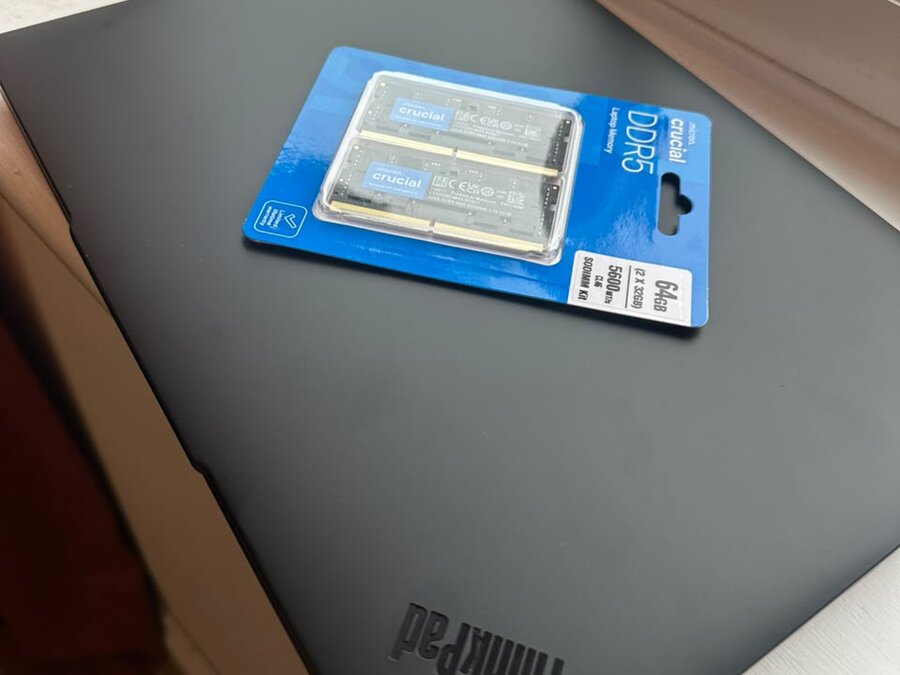
So rather than paying a huge premium to the laptop manufacturer for additional memory, I bought a 64 GB Crucial DDR5 SO-DIMM kit separately.
Then I installed it myself.
That's one of the things I wanted from this laptop in the first place.
I didn't want my hardware configuration to be permanently determined by what I selected at checkout.
I wanted to be able to buy the machine, open it up and change it.
And that's exactly what I did.
The result?
A compact 14-inch ThinkPad with 64 GB of RAM, built around what I actually need rather than what happened to be available in a preconfigured SKU.
# And then I removed Windows
The next step was arguably the most important one.
I installed Fedora 44 Workstation.
I've been increasingly interested in Linux, not just as something to experiment with, but as a serious development environment.
I've used Linux before, but this time I wanted to approach it differently.
Not as a secondary operating system.
Not as something sitting alongside Windows "just in case."
I wanted the ThinkPad to be a proper Linux machine.
And Fedora on the ThinkPad has been a surprisingly good combination.
There is something satisfying about taking a machine designed for business and engineering workloads, installing Linux on it, upgrading the memory yourself and then configuring the environment exactly the way you want it.
It feels less like buying an appliance and more like building a computer.
# The funny thing about the L14
If you look at the laptop market today, a lot of the attention goes toward premium materials, incredibly thin chassis, OLED displays, ultra-high resolutions and increasingly expensive configurations.
Those machines are impressive.
But they aren't necessarily what I need.
I'm a software engineer.
I spend most of my time writing code, reading code, running services, working with terminals, researching, experimenting and building things.
I don't need my laptop to look like a piece of jewellery.
I need it to work.
I want a keyboard I can type on for hours.
I want ports.
I want upgradeability.
I want Linux support.
I want enough RAM.
I want something I don't have to baby.
And I want to be able to throw it into a backpack and take it with me.
The L14 fits that philosophy extremely well.
# The two-machine setup makes more sense
What I ended up with is actually much closer to what I wanted all along.
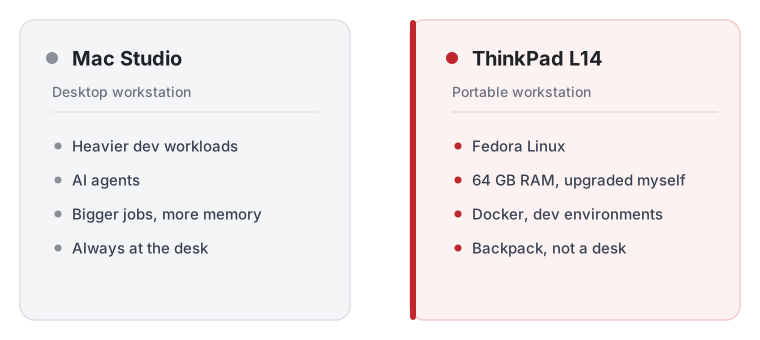
# Mac Studio
My desktop workstation.
The heavier machine.
The place for AI agents, larger workloads and everything that benefits from staying permanently connected to a desk.
# ThinkPad L14
My portable workstation.
Fedora Linux.
64 GB RAM.
Development.
Research.
Docker.
Experiments.
Travel.
And something I can physically carry around without feeling like I'm transporting a desktop PC.
Instead of trying to make one machine perfect at everything, I gave each machine a job.
And that has turned out to be a much better approach.
# The economics were the biggest surprise
This is probably the part I find most interesting.
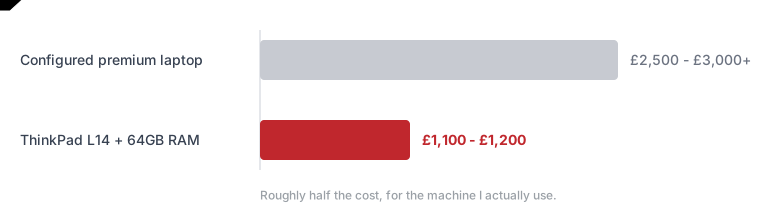
I had been looking at laptops costing £2,500-£3,000 or more once configured with the memory I wanted.
Instead, I ended up spending roughly £1,100-£1,200 total on the ThinkPad and the 64 GB RAM upgrade.
That's a substantial difference.
And I didn't end up with something that feels like a compromise.
I got the RAM I wanted.
I got Linux.
I got a proper ThinkPad.
I got a 14-inch portable machine.
And I got the satisfaction of installing and configuring the system myself.
The point isn't that everyone should buy an L14.
It's that the most expensive option isn't automatically the best option for your particular workflow.
Sometimes the better solution is to stop looking for the perfect preconfigured machine and instead build the configuration you actually want.
# What changed my mind
Initially, I was thinking like a laptop buyer:
"What's the best laptop I can buy?"
Eventually, I started thinking like an engineer:
"What's the best system I can build from the hardware available to me?"
That's a very different question.
And once I changed the question, the answer became much clearer.
I didn't need a £3,000 laptop.
I needed a good laptop, a lot of RAM, Linux, and a workstation that could handle the heavier stuff at home.
That's what I built.
And honestly?
I'm really enjoying it.
There's something particularly satisfying about a machine that isn't trying to impress you on a spec sheet.
It just sits there, runs Fedora, handles my development environment, gives me 64 GB of memory, has a great keyboard, and gets out of the way so I can actually do my work.
Sometimes the best computer isn't the one with the most impressive specifications.
It's the one that fits the way you actually work.
Thanks for reading, if you would like to hear more from me, feel free to reach out via email or follow me on Twitter.